

Here’s how to tailor a large language model to boost efficiency and accuracy in your lending business.
Real estate lenders are working hard to adapt and innovate as technology evolves and borrower expectations shift. One of the most significant areas of transformation is the speed and efficiency of lending processes.
Artificial intelligence (AI) plays a critical role in this transformation. With speed now a top priority for borrowers, AI is well-positioned to shape the future of private lending. More lenders are adopting this technology to remain competitive and responsive. Maximum efficiency, particularly in time-intensive areas such as appraisal reviews, is no longer optional.
This guide offers a practical, hands-on approach for private lenders looking to implement AI tools, with a focus on GPT technology. For those aiming to improve speed and accuracy in appraisal reviews, a custom GPT offers a highly tailored and effective solution. Although this walk-through uses OpenAI’s ChatGPT as an example, the steps also apply to other large language models such as Microsoft Copilot and Anthropic’s Claude, with slight adjustments.
What Can a Custom GPT Do?
A custom GPT is a version of ChatGPT a user creates and trains for a specific purpose. You can simply tell the GPT builder what you want to achieve, and the system helps you build a tool around that task.
Although they may sound similar, ChatGPT and a custom GPT are not the same. ChatGPT refers to the general-purpose Generative Pretrained Transformer; a custom GPT is a tailored version that can serve a narrow and well-defined function such as reviewing appraisals.
The benefits of a custom GPT include the ability to create specific prompts, upload your own documents for reference, and generate consistent, tailored outputs that align with your internal processes.
Set Up a Custom GPT
The good news is you don’t need coding skills or a tech background to build your own GPT. OpenAI’s tools are designed to be user-friendly and accessible. Here’s a step-by-step guide for private lenders to create a custom GPT that supports appraisal reviews.
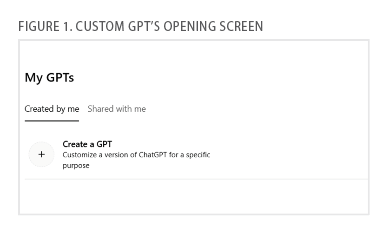
Step 1: Create Your GPT. Before anything else, you’ll need access to a ChatGPT account. Once logged in, navigate to the “Explore GPTs” section on OpenAI’s platform. Click on “Create a GPT” to begin the guided setup process (see Fig. 1).
Step 2: Begin Prompting. In the Create panel, enter your first prompt to guide the GPT’s behavior (see Fig. 2).
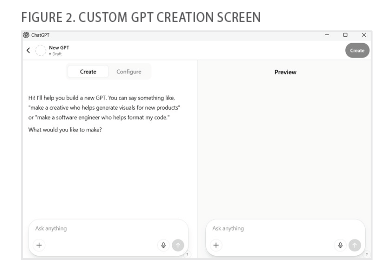
A good example might be:
“You are a real estate lending assistant. Your job is to review residential real estate appraisals and extract key information including property value, condition, comparable properties (comps) analysis, red flags, and neighborhood insights.”
This gives the model a strong foundation for how it should function. The goal here is to establish its personality and task scope. You can also include details on how you want the GPT to format its responses (e.g., bullet points or section headers) to match your team’s preferences. The clearer the initial instruction, the less tweaking you’ll need later.
Press Enter to allow the system to begin configuring the GPT.
Step 3: Work with the GPT Builder. Once the initial prompt is set, the GPT builder will begin generating behavior for your GPT. You can now refine the GPT’s instructions by interacting with the Preview panel in real time (see Fig. 3).
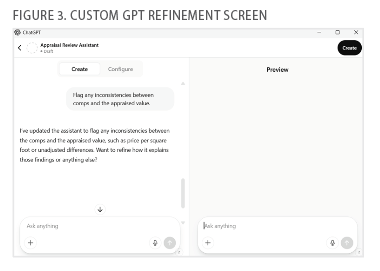
For example, you might add:
“Flag any inconsistencies between comps and the appraised value.”
The GPT builder will make recommendations as you go. You can accept these suggestions, reject them, or modify them to better suit your process. This back-and-forth helps ensure the GPT outputs exactly what you’re looking for. Try prompts with vague appraisals or multiple comps to ensure the GPT handles variation well.
Step 4: Refine with Files and Enable Uploads. Enable the file upload feature so you can drag and drop appraisal PDFs directly into the GPT chat (see Fig. 4).
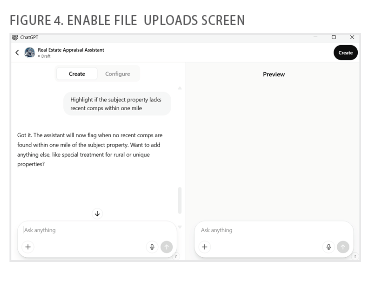
You can also upload example files and add test questions to check the model’s ability to interpret specific appraisal formats or terminology. This step is key to making the GPT adaptable to your business.
If the model needs more context or seems to miss details, continue refining the instructions. You might need to include additional expectations such as:
“Highlight whether the subject property lacks recent comps within one mile.”
Adding clear examples and constraints makes the GPT more reliable. Equally important is ensuring clear file inputs, because the automation is only as good as the information it receives.
Step 5: Test and Review Outputs. Once your GPT is configured, test it using real or sample appraisal reports. Review its summaries and responses to make sure it’s capturing the right data points, red flags, and observations (see Fig. 5).
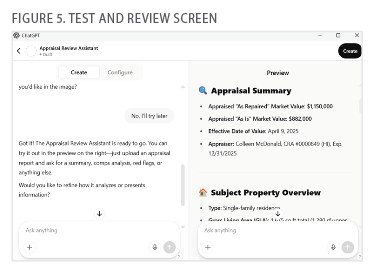
If something isn’t correct, revise your prompts or instructions.
Keep your prompts concise but clear. The cleaner your instructions, the better the model will perform. Run multiple tests to see how it handles different types of appraisals.
Step 6: Finalize and Customize. Now that your GPT is functioning correctly, you can personalize it further. Give it a name like “MyCompany Appraisal Review Assistant,” upload a profile picture, and update the system description. Adding a short internal-use summary of what the GPT is designed to do can also help new users on your team use it more effectively (see Fig. 6).
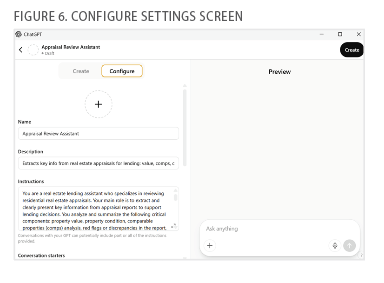
Review the builder-generated conversation starters and modify them to align with your team’s needs.
Once everything looks good, click Create to publish your GPT. You can share it privately with your team or make it publicly accessible. From here, it’s ready to use in your daily workflow.
Put Your Custom GPT to Work
An appraisal review is one of the most time-consuming parts of the loan process. A custom GPT can make this easier by handling the first level of analysis. All you need to do is upload an appraisal PDF and provide a prompt like:
“Summarize this appraisal and highlight any issues with comparable properties or condition ratings.”
The GPT will then output a review summary that points out key findings or discrepancies. For example:
“Comp #2 is located 2 miles away and may not be a strong comparable.”
This gives you a fast overview of the appraisal and flags any concerns without needing to comb through the full document yourself. You can also export the GPT’s summary for your team. What used to take 30 minutes or more can now take five minutes or less.
Additional Use Cases in Lending
Although appraisal reviews are a strong starting point, you can use custom GPTs throughout the private lending process. Here are other valuable applications:
Reviewing Borrower Applications. Use a GPT to review borrower submissions for completeness. The model can scan documents to identify missing information or inconsistencies, helping you respond to borrowers faster.
Generating Documents Automatically. You can automate the creation of loan documents, such as term sheets or agreements, using data the borrower has already submitted. This reduces manual entry and helps keep your pipeline moving.
Answering Borrower FAQs. Create a chatbot that fields common borrower questions about programs, timelines, required documents, and underwriting criteria. This reduces the burden on loan officers and improves turnaround times for support.
Analyzing Portfolio Performance. Use AI to summarize borrower portfolio health and to surface red flags such as missed payments, maturing loans, or opportunities for refinancing. Alerts can also be built into the model to notify your team when a follow-up is needed.
Although this guide walked you through using a custom GPT for appraisal reviews, the same principles apply to many parts of the loan lifecycle. With thoughtful setup and prompting, a custom GPT can become a valuable member of your team.







Leave A Comment